
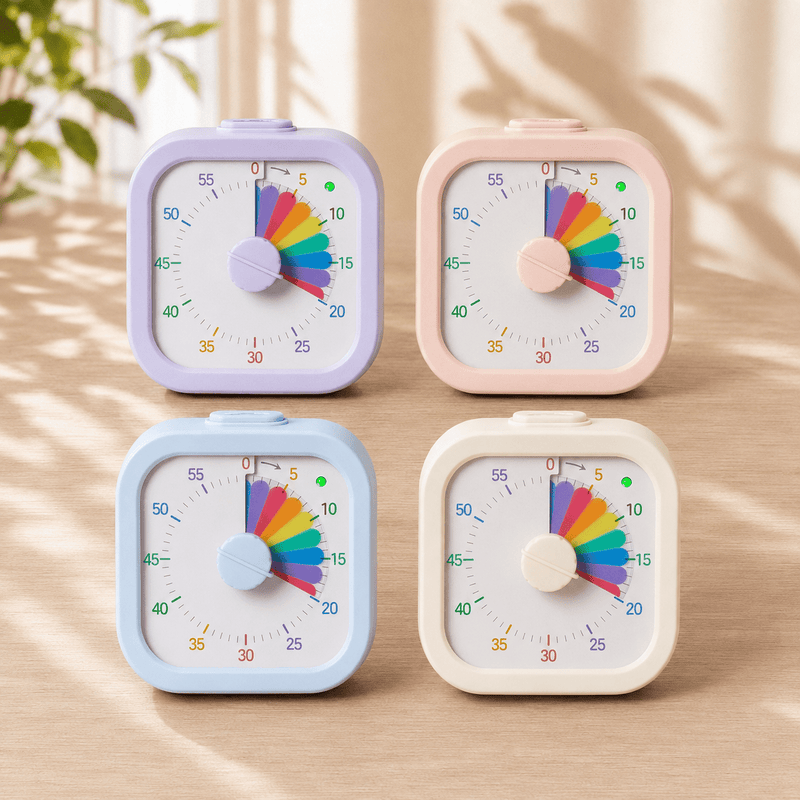
Visual timer
Time, made visible, for children who can't read clocks yet.
- Transitions end in meltdowns — leaving the park, ending screen time, finishing meals
- Your child argues every time you say "two more minutes"
- Homework drags because there's no visible end
- They can't tell how long is left for anything
- You're tired of saying "almost done" twenty times
The idea behind it
The visual timer shows time as a shrinking red disc. Your child watches the red shrink across the dial, sees how much is left, and prepares themselves for what comes next. Set 5 minutes, 15 minutes, an hour - the dial moves silently. No ticking. Optional beep at the end (you choose to enable or mute).
Used in OT clinics, classrooms, and homes the world over. Now built into the NeuroBuddy curriculum as the bridge between routines and independence.
Battery not included.
Best for
Children aged 3+ who struggle with transitions, time awareness, or "five more minutes" promises.
What's inside
How to use it at home
Use it for things they enjoy
Don't introduce it with the hard transitions first. Set it for fun activities — 20 minutes of play, 15 minutes of screen time. Your child learns the dial means "this much time of something good." That association comes before the harder use.
Add it to the hard transitions
Now use it for the moments that usually end badly. Set 5 minutes before "leave the park." Set 10 minutes before "finish homework." Place the timer where they can see it. Let them watch the red shrink.
Hand them the timer
Independence step: instead of you setting it, ask your child to set it. "How long do you want for screen time?" Give them control. Children who set their own timers fight the end far less than children who have it set for them.
Every product is designed with occupational therapists
Our clinical panel works with Indian children every day. Every product is reviewed for safety, developmental fit, and how well it works in a real home — not just a clinic. If your child's OT recommends something different, listen to them first. We're a tool, not a substitute for therapy.
Take the 5-minute Readiness Check
17 questions across 6 areas. At the end, you'll get a personalised list of which tools are right for your child today — and which to wait on.